MCP tool
This page lets user to generate MCP tools by using JDBC datasource or custom entity models.
Navigate to the MCP tool gen:
Go to DEVELOP >> MCP >> MCP Tool
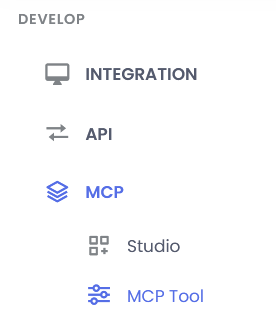
Generating of MCP tools:
In MCP tool gen you can create the tool using
- Auto (JDBC datasource)
- Design (entity model)
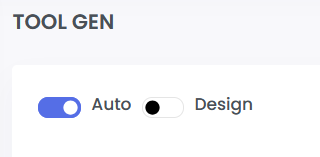
Tool generation using Auto
- Toggle the Auto button if not selected
- Select the project name from the dropdown in which the tools is to be generated
- To create new JDBC datasource connection follow below steps:
note
The DDL schema should be present already. To upload new DDL schema refer Data API
- Click on the plus sign
- Add the datasource name
- Select the DDL schema already uploaded
- Click submit
- Select the datasource name from the dropdown list
- Select the entity from the dropdown list
- Select the fields in the Entity Structure section which needs to be present in MCP tool
- After selecting the fiels, click on the view button to see the tool name, tool description, parameters, methods.
- If everything is verified, finally click on generate button to generate MPC tools in the project
- The page will be redirected to the MCP studio page, after all required tools are generated.
Tool creation using Design
- Toggle the Design button
- Select the project name from the dropdown in which the tools is to be generated
- Input the entity name
- Add the required fields in the Entity Structure section which needs to be present in MCP tool
- After selecting the fiels, click on the view button to see the tool name, tool description, parameters, methods.
- If everything is verified, finally click on generate button to generate MPC tools in the project
- The page will be redirected to the MCP studio page, after all required tools are generated.