Dynamic Datasource Connector
The Dynamic Datasource Connector provides a flexible way to interact with external services, particularly REST APIs, where connection parameters are not predefined but are determined dynamically at runtime from the pipeline data. Unlike traditional connectors that rely on pre-configured datasources and client beans initialized at startup, this connector creates the necessary client configurations per request, offering unparalleled adaptability for dynamic integration scenarios.
- This connector is currently implemented as a Dynamic REST Connector, leveraging the underlying
INTRESTProcessorfor its operations. - It is ideal for scenarios where connection details (such as protocol, domain, or base path) need to vary based on the incoming request or flow data.
- The REST client is created at runtime for each request, allowing for highly dynamic and context-specific integrations.
Key Features
- Runtime Configuration: All connection parameters are resolved dynamically from the pipeline, eliminating the need for static, predefined connection properties.
- Flexible Integration: Supports integration with a multitude of REST services whose endpoints or authentication mechanisms might change per transaction.
- Full REST Method Support: Inherits support for all standard HTTP methods (GET, POST, PUT, DELETE, PATCH) from the underlying REST processor.
Configuration
To configure the Dynamic Datasource Connector, follow these steps:
- Drag and drop the Dynamic Datasource Connector onto your design canvas and assign it a meaningful name.
- Access its configuration properties. The fields below are designed to accept dynamic values, typically from pipeline variables (e.g.,
$REQUEST_PARAMS,$VARIABLES).
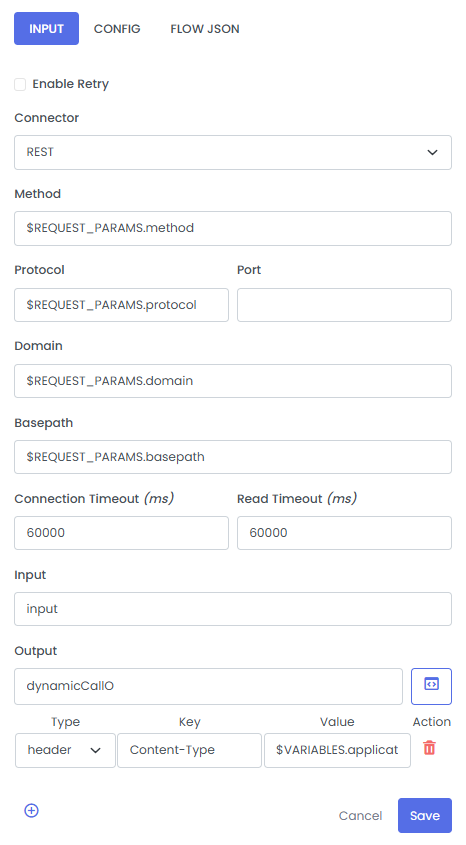
| Fields | Description | Example (Dynamic Value) |
|---|---|---|
| Enable Retry | A checkbox to enable or disable automatic retries for the dynamic call in case of failure. | (checkbox) |
| Connector | Specifies the type of underlying connector to be used dynamically. Currently, this is fixed to REST. | REST |
| Method | The HTTP method to be used for the request. This value is typically sourced from pipeline parameters. | $REQUEST_PARAMS.method |
| Protocol | The protocol (e.g., http, https) for the dynamic connection. | $REQUEST_PARAMS.protocol |
| Port | The port number for the dynamic connection. | (empty or dynamic value) |
| Domain | The domain name or IP address of the target service. | $REQUEST_PARAMS.domain |
| Basepath | The base path for the API endpoint, appended to the domain. | $REQUEST_PARAMS.basepath |
| Connection Timeout (ms) | The maximum time in milliseconds to wait for a connection to establish. | 60000 |
| Read Timeout (ms) | The maximum time in milliseconds to wait for data to be received after a connection is established. | 60000 |
| Input | The request body or input data for the dynamic call. This can be a static string or a pipeline variable. | input (or a dynamic variable like $REQUEST_PAYLOAD) |
| Output Variable | The name of the variable where the response from the dynamic call will be stored. | dynamicCallO |
| Headers | Key-value pairs for HTTP headers, which can also be dynamically set. | Type: header, Key: Content-Type, Value: $VARIABLES.applicationType. Can be static. |
| Query Param | Key-value pairs for query params, which can also be dynamically set. | Type: query params, Key: Name of the param, Value: value can static or dynamic |
| Path Param | Key-value pairs for path param, which can also be dynamically set. | Type: path params, Key: Name of the param, Value: value can static or dynamic |
Supported Operations
As the Dynamic Datasource Connector leverages the underlying REST processor, it supports all standard HTTP methods:
- GET
- POST
- PUT / PATCH
- DELETE
Retry
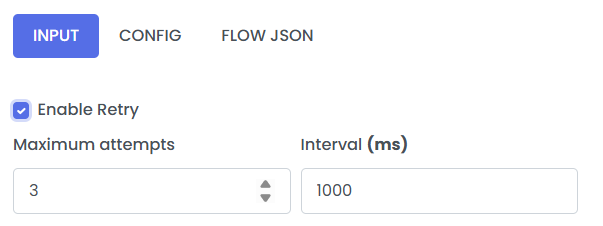
Retry is flag passed on connector nodes, like SOAP, to allow the step to be retryable if any exception occurs. It has 2 configurable properties.
- maxRetryAttempts: The max number of retries if any exception occurs. max attempts are 3.
- retryIntervalMillis: The max interval between retries. Max range is 6000ms.
Enable retry by cliking on the Enable Retry radio button at the top of the configuration pannel.